October 16, 2026
Podium: A Control Room for Claude Code
A Claude Code session would be sitting at a question or a permission prompt, waiting on me, and I wouldn’t know. I’d be in another window or another session, and the time it sat there was simply gone. Add a few orchestrators, each spawning its own subagents and forks, and I was spending more effort figuring out what was happening than getting anything done.
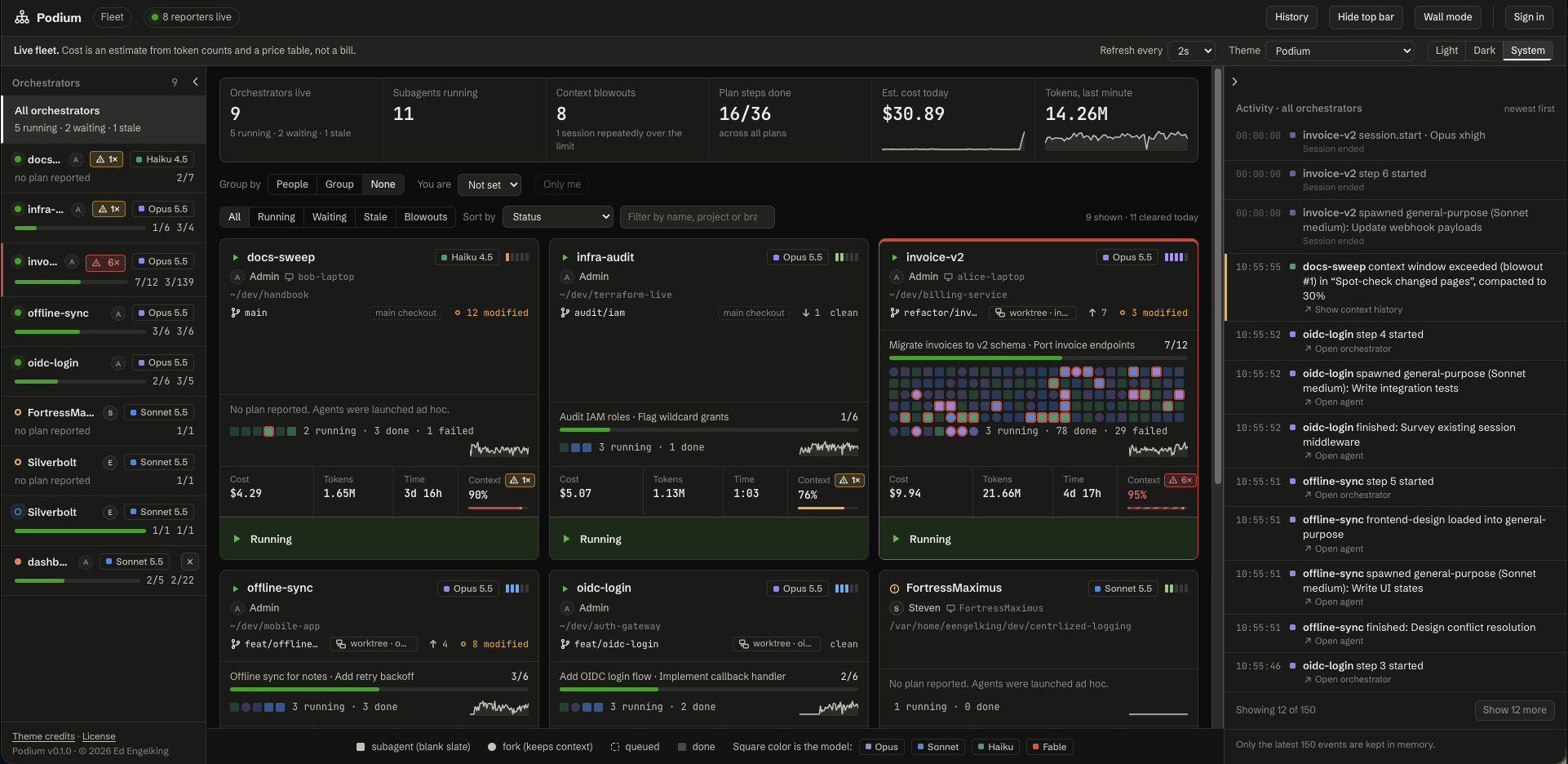
So I built something to show me. It’s called Podium, it’s free, and this is the launch post.
TL;DR
- Podium is a web console that shows every Claude Code session, its subagents and forks, what each costs, and how full each context window is, in one tab. It works for one developer or a whole team.
- It exists because Claude Code now supports mods: plugins that run inside Claude Code and can see what settings hooks can't. My mod, podium-reporter, ships that data to Podium.
- You can also answer a waiting session from the browser. That ability is off by default and sits behind five separate switches.
How I got here
I’ve been using AI for a while, but I really dove in during 2023 with OpenAI’s ChatGPT. Once agents became a thing, I realized they were the next major leap forward. The limit was the context window.
Then Claude Code was released, and it changed my development process. As Anthropic added agents and skills, I found myself using it as my only development tool. And as my usage grew, I needed a way to track the agents, subagents, and forks it was running.
For me, visualizing what a coordinator or orchestrator is doing hasn’t been great. Anthropic has been making changes to make it easier to follow, but there was still a gap. I wanted to see all of my agents and their work at once, and I wanted to track what they cost.
As an architect, I also wanted to see what other developers’ agents are doing.
Hooks weren’t enough
I’d wanted to extend Claude Code for a while, but it didn’t make that easy. Settings hooks could collect some information, and they were limited. They run a shell command or an HTTP request when an event fires (Claude Code Docs, “Mods overview”). Podium can take reports from them, so here is one of the entries from its README:
"SessionStart": [{ "hooks": [{ "type": "command", "command": "curl -s -m 2 -X POST -H 'Content-Type: application/json' --data-binary @- http://127.0.0.1:4317/api/fleet/hook >/dev/null || true" }] }]It posts what Claude Code hands it to Podium. What arrives is the session, its working directory and model, agents by type, and waiting or ended states. What doesn’t arrive is token counts, so context fill, cost, and the plan stay empty. Hooks also send no heartbeat, so a session reported only by hooks can go quiet for ten minutes before Podium marks it stale (Podium README, “Sessions without the mod”).
That’s a reduced view, and it was never going to be the single pane of glass I wanted.
Then came mods
A mod is a plugin made of JavaScript or TypeScript event handlers. Claude Code calls a handler when something happens, like a tool call or a submitted prompt, and the handler can watch the event, change it, or take it over. Unlike a settings hook, a mod runs inside Claude Code, so it can also draw its own interface and see each request’s token usage (Claude Code Docs, “Mods overview”). Some of Claude Code’s own features, such as /diff, are built as mods, and their source is public (anthropics/claude-code, mods).
I realized right away that this was what I’d been waiting for. It meant I could see which orchestrators were running, their subagents and forks, the skills they loaded, and what it all cost.
Podium and podium-reporter
So I built my own mod, podium-reporter, and a central website called Podium. The reporter watches what’s happening inside Claude Code and ships it to Podium. Podium shows every session within about two seconds of its first prompt.
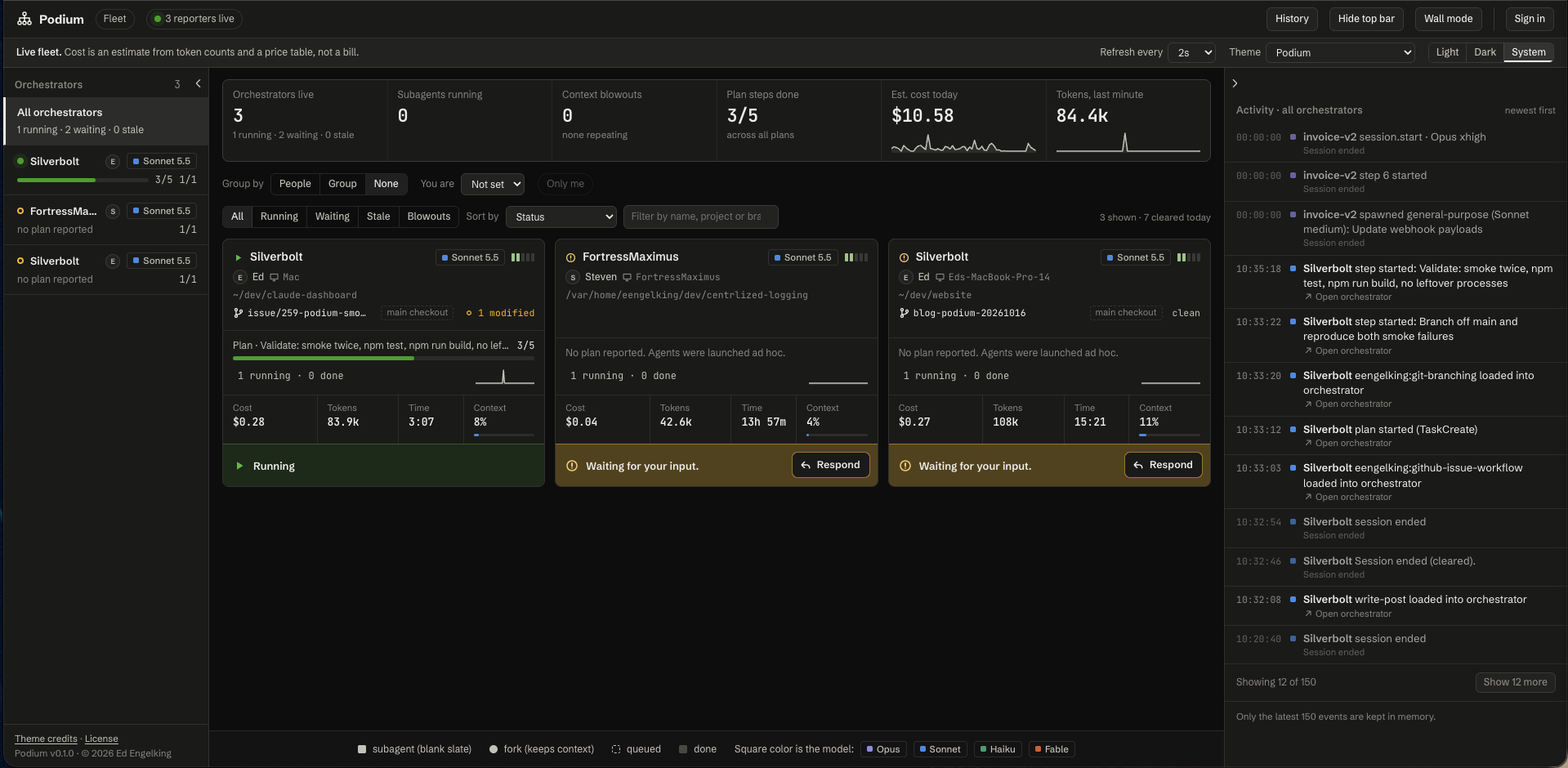
It works for several developers at once. Each person gets their own token from Podium’s Admin page, and once their sessions report, the console can group the wall by person. One tab can show a whole team’s Claude Code work.
The features I use most
Podium does more than I’ll list here, but three things are why I built it:
- A single pane of glass. Every session on one wall, with its model, effort, context fill, estimated cost, and git branch or worktree. A session that needs you turns amber and says whether it wants approval or input. Cost is an estimate from token counts and a price table you can edit, not a bill.
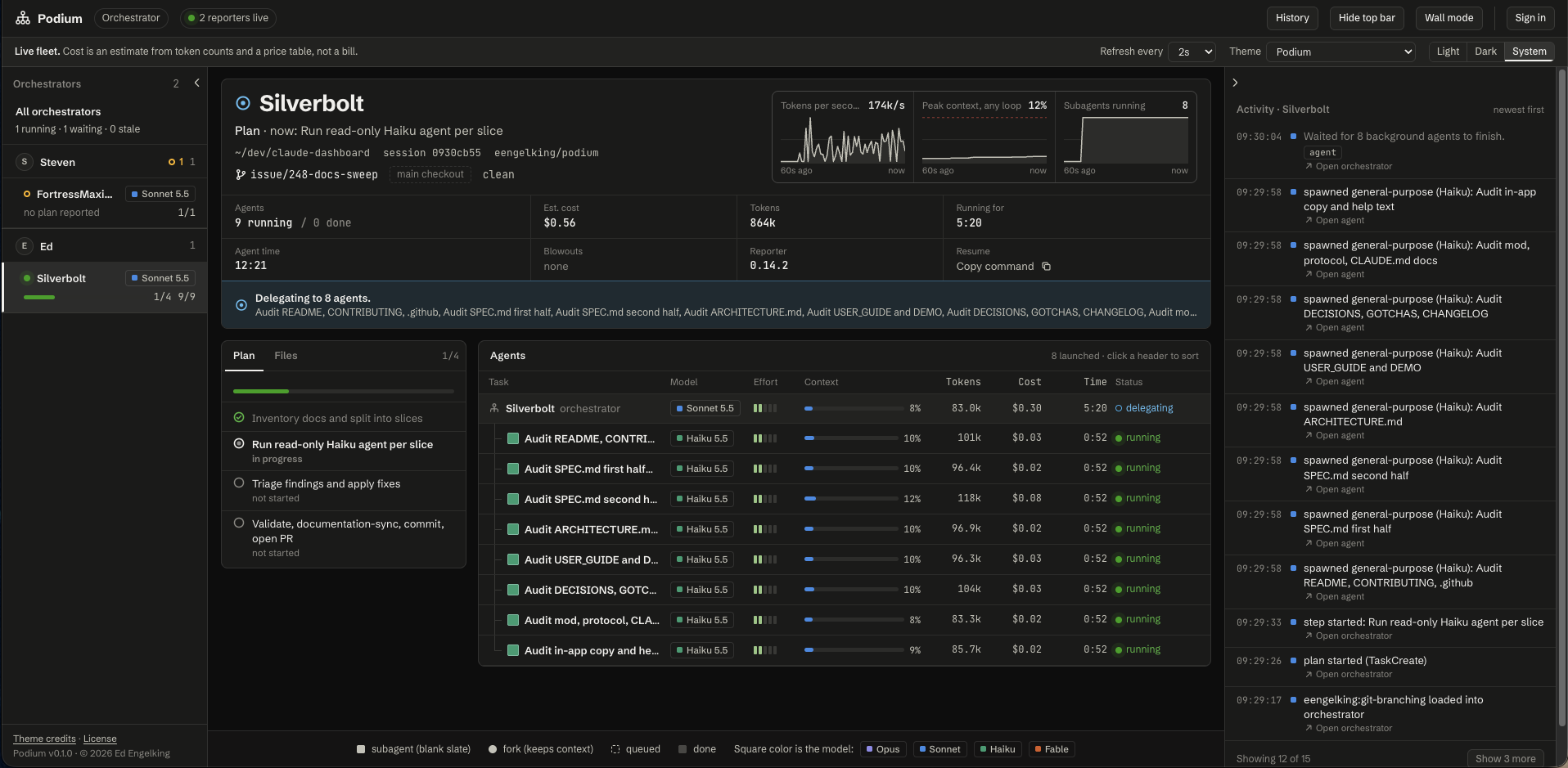
- Drilling down into subagents. Open an orchestrator and you get its plan, and a row for every subagent and fork it launched, each with its own model, context, tokens, cost, and running time.
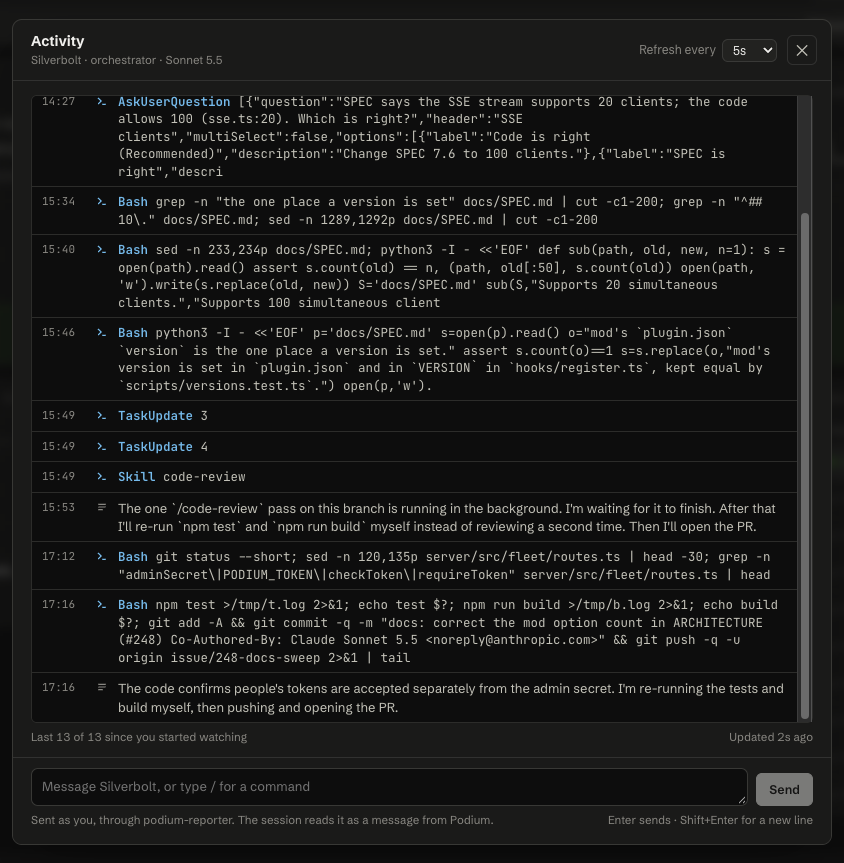
- Talking to agents from the browser. Open any agent’s panel and you can watch its last 20 tool calls and the text it writes between them. If the session is waiting on you, you can answer there.
Security
Once Podium could answer a session, it stopped being a tool that only watches. Anyone who could send an answer could put text into someone’s session, so that capability had to be built carefully. Here is how it works:
- It’s off by default, behind five switches. The server has to be started with a token, and the server’s Admin has to turn on both Respond from Podium and the agent activity feed. On the machine, the mod’s
respondandactivityFeedoptions have to be on too. - Each session chooses how much it accepts. The
respondoption has four levels:off,questions,questions-and-plans, andeverything. The person running the session sets it, and the mod enforces it. - Tool approval is allow once only. “Always allow” and every slash command except
/clearand/compactstay in the terminal. - Only the session’s owner or an Admin can answer. A token only works with the name it was made for, so a leaked token can’t claim someone else’s name. Tokens are 192 bits and stored as hashes.
- The server never connects into a session. The mod fetches answers from the server, in the same direction it reports, so nothing in a session listens on a port.
- The terminal keeps working. Its own dialog and the browser race, and whichever answers first wins. Each answer is written to the admin log without its text.
Podium’s design notes cover the rest: a check on the Host header against DNS rebinding, and a throttle on wrong admin-secret guesses (Podium, “Decisions”). Before anything leaves a session, text is cut to fixed limits and anything that looks like a secret, such as an sk-ant- key or a Bearer value, is replaced with [redacted]. By default only the first 400 characters of a prompt are sent.
There are limits worth knowing about. Tokens travel over plain HTTP, so a server reachable over a network needs a network you trust or a TLS proxy in front. And a mod, any mod, is code that runs with your permissions and isn’t sandboxed, so read one before you install it (Claude Code Docs, “Mods overview”). claude plugin validate lists what a mod asks Claude Code to do before you load it.
Try it
Podium is free and open source under the MIT license. It needs Node 24 and npm, and runs in a Podman container by default:
git clone https://github.com/eengelking/podium.git && cd podium && npm link
podiumctl start
Then, in Claude Code, install the reporter:
/plugin marketplace add eengelking/skills
/plugin install podium-reporter@eengelking-marketplace
The code, the docs, and the issue tracker are at github.com/eengelking/podium. Start a session, send a prompt, and it shows up in the tab.
Now when a session is waiting on me, I see it.
Key Takeaways
- Settings hooks can tell you a session started or stopped. They can't give you token counts, cost, or context fill. Mods run inside Claude Code and can.
- Podium puts every session, subagent, and fork in one tab for one developer or a team, and lets you answer a waiting session from the browser.
- Responding is off by default behind five switches, allows a tool once only, and works only for a session's owner or an Admin.
- It's free, MIT licensed, and at github.com/eengelking/podium.